


Table of Contents
Introduction
Cache memory is a small, ultra-fast, volatile storage component—typically built using Static RAM (SRAM)—located inside or very close to the CPU. It stores frequently accessed data and instructions to bridge the speed gap between the high-speed processor and slower main memory (DRAM). By reducing latency and preventing processor idle time, cache memory significantly improves overall system performance.
Cache Memory Overview
| Feature | Description | Key Benefit |
| Definition | Small, high-speed memory storing frequently used data | Faster CPU access |
| Technology | Usually SRAM (faster but costly) | Low latency |
| Volatility | Data lost when power is off | Temporary storage |
| Location | On-chip or near CPU | Reduced access time |
| Purpose | Bridges CPU–RAM speed gap | Improved performance |
| Capacity | Smaller than RAM | Cost & speed optimization |
| Access Speed | Much faster than DRAM | Quick execution |
| Function | Stores instructions & data | Smooth processing |
Why it matters: Cache reduces the “memory bottleneck” by minimizing slow main memory access.\
Levels of Cache Memory
| Level | Location | Speed | Size Range | Function | Notes |
| L1 Cache | Inside CPU core | Fastest | 32–128 KB | First lookup | Separate instruction & data caches |
| L2 Cache | On/near CPU | Fast | 256 KB – few MB | Backup for L1 | Larger but slower |
| L3 Cache | Shared across cores | Slower | Few MB – 50+ MB | Reduces memory access | Shared among cores |
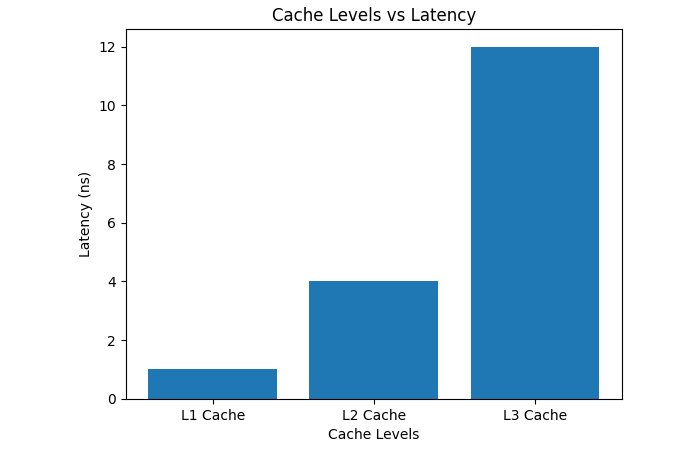
L1 is fastest but smallest; L3 is largest but slower.
How Cache Memory Works
Step-by-Step Operation from hazelcast.com
- CPU requests data.
- Cache is checked first.
- Cache hit → data returned instantly.
- Cache miss → data fetched from lower cache or RAM.
- Data stored in cache for future use.
This process minimizes CPU wait time.
How to Use Cache Memory
| Area | How to Use It |
|---|---|
| Programming | • Access data sequentially• Use arrays instead of scattered structures• Reuse frequently used variables |
| Web Browsers | • Enable browser caching• Clear cache if content is outdated• Use hard refresh when needed |
| Operating System | • Keep system updated• Allow OS to manage memory automatically• Avoid running too many heavy applications |
| Hardware | • Choose CPUs with larger cache for better performance• Avoid overheating to maintain cache efficiency |
How to Remove Cache Memory
| Device / Platform | Steps to Clear Cache | Shortcut / Command | Important Notes |
| Windows (Chrome Browser) | 1. Open Chrome 2. Press Ctrl + Shift + Delete 3. Select Cached images and files 4. Choose All time 5. Click Clear data |
Ctrl + Shift + Delete | You may be logged out of some websites. |
| Windows (DNS Cache) | 1. Press Windows + R 2. Type cmd 3. Enter ipconfig /flushdns 4. Press Enter |
ipconfig /flushdns | Fixes internet connection or website loading issues. |
| Android | 1. Open Settings 2. Tap Apps 3. Select the app 4. Tap Storage 5. Select Clear Cache |
— | Do NOT tap “Clear Data” unless necessary. |
| iPhone (Safari) | 1. Open Settings 2. Tap Safari 3. Select Clear History and Website Data |
— | This removes browsing history and cookies too. |
| Mac (Safari Browser) | 1. Open Safari 2. Click Safari → Settings 3. Go to Privacy 4. Click Manage Website Data → Remove All |
Option + Command + E | Clears stored website files and cookies. |
Quick Benefits of Clearing Cache
| Benefit | Explanation |
| Improves Speed | Removes temporary files slowing down the system |
| Fixes Errors | Solves loading or formatting problems |
| Frees Storage | Deletes unnecessary cached data |
| Refreshes Content | Loads updated website versions |
Advantages and Limitations of Cache Memory
| Advantage | Explanation | Limitation | Explanation |
| Reduced latency | Faster data access | High cost | SRAM is expensive |
| Increased CPU efficiency | Prevents idle cycles | Limited size | Cannot store all data |
| Improved multitasking | Faster program switching | Complexity | Requires sophisticated management |
| Lower memory traffic | Fewer RAM accesses | Power usage | High-speed operation consumes energy |
| Better system responsiveness | Smooth performance |
Cache improves system responsiveness by storing frequently used data near the CPU.
Cache Level vs Speed & Size
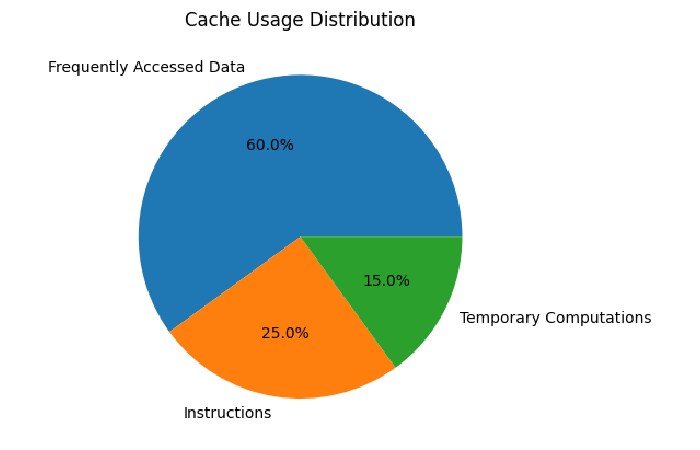
Cache Usage Distribution
Cache Mapping Techniques
| Mapping Technique | How It Works | Advantage | Disadvantage |
| Direct Mapping | Each memory block → one cache location | Simple & fast | Conflict misses |
| Associative Mapping | Block can go anywhere | Flexible | Slower search |
| Set-Associative | Cache divided into sets | Balanced performance | More complex |
Mapping determines how memory blocks are placed in cache.
Future Trends in Cache Memory
| Trend | Description |
| Hybrid SRAM-DRAM caches | Larger capacity with speed |
| AI-optimized caching | Predictive data storage |
| Multi-level deep caches | L4 & beyond |
| Energy-efficient designs | Lower power consumption |
Research explores DRAM-based caches to improve scalability and energy efficiency.
Real-World Applications
| Domain | Use of Cache |
| CPUs & GPUs | Speed up processing |
| Mobile devices | Improve battery efficiency |
| Web browsers | Store pages & images |
| Databases | Faster query results |
| Operating systems | Disk caching |
Cache memory enhances performance across computing systems.
Conclusion
Cache memory is a critical component of modern computer architecture. By storing frequently accessed data near the CPU, it reduces latency, enhances processing speed, and prevents bottlenecks caused by slower main memory. Through multi-level hierarchies, intelligent mapping, and optimized write policies, cache memory ensures efficient system performance across applications—from personal devices to enterprise servers.
FAQs
- What is cache memory?
Cache memory stores temporary files to help apps and websites load faster.
- Is it safe to clear the cache?
Yes, clearing cache is safe and helps improve performance without deleting important personal data.
- Will clearing cache delete my photos or files?
No, it only removes temporary files. Your personal data stays safe.
- How often should I clear the cache?
Once every few weeks or when your device feels slow is usually enough.
- What is the difference between clearing the cache and clearing the data?
Clear Cache removes temporary files, while Clear Data resets the app and deletes login information and settings.