

Table of Contents
What Is a Printer Using CD?
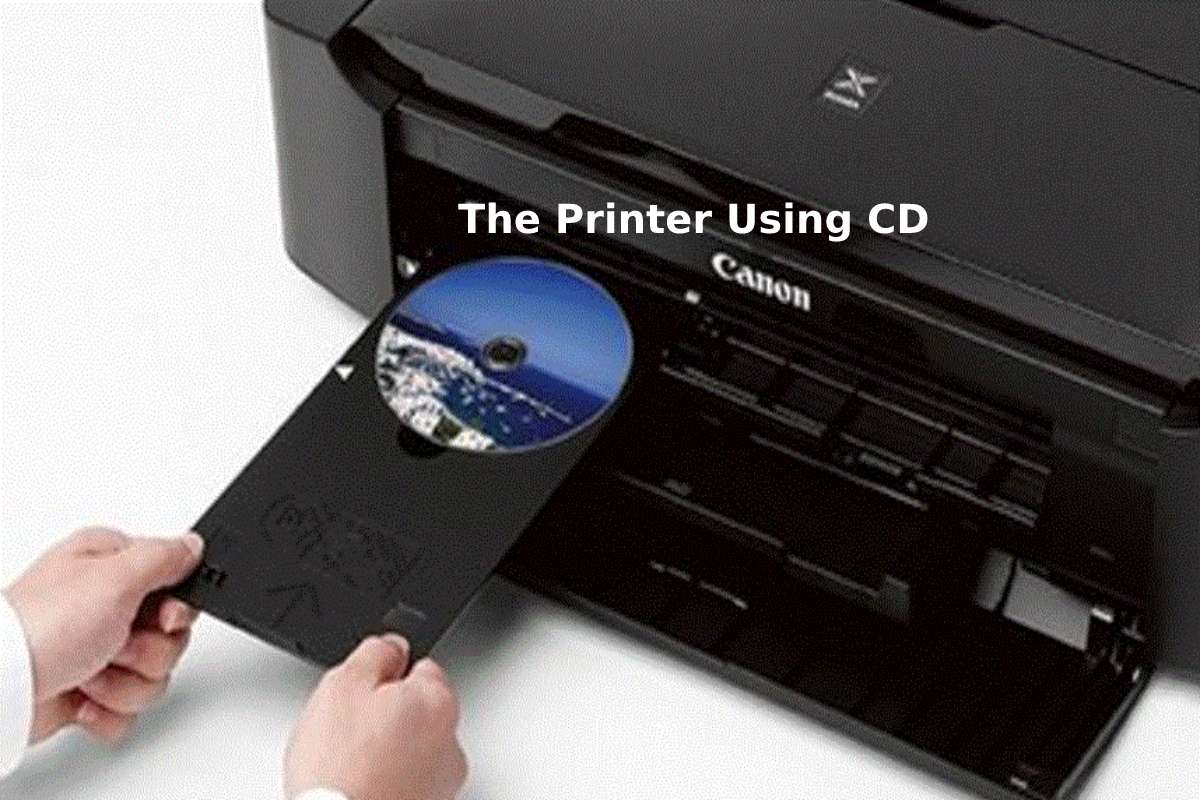
A printer using CD refers to a specialized printer capable of printing images, text, or designs directly onto the surface of printable CDs or DVDs. Unlike traditional labeling methods that use stickers, CD printers apply ink directly onto the disc using special printable surfaces. This technology is commonly used for creating professional-looking discs for software distribution, music albums, movies, business presentations, and archival storage. Modern disc printers support high-resolution printing and automated disc loading systems, allowing users to print large numbers of discs efficiently.
How CD Printing Works
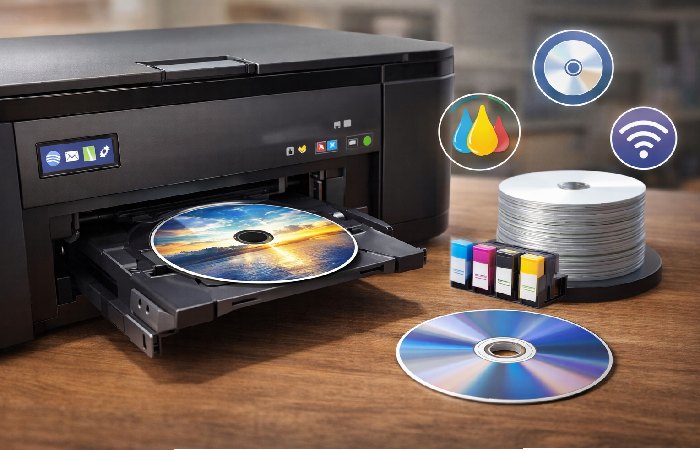
CD printing involves a process where a printer applies ink directly to the printable surface of a disc using specialized trays and printing mechanisms.
Basic Working Process:
- A printable CD or DVD is placed in a special disc tray.
- The printer pulls the tray inside and positions the disc for printing.
- The print head sprays ink onto the disc surface.
- The printer software controls the design and alignment.
- The printed disc is ejected once printing is completed.
Manufacturers such as Epson and Canon produce printers that support direct disc printing technology.
Evolution of CD Printing Technology
| Period | Technology Stage | Key Development |
| 1990–2000 | Manual Label Printing | Sticker labels placed on discs |
| 2000–2008 | Inkjet CD Printing | Direct printing using disc trays |
| 2008–2015 | Thermal Printing | High durability professional printing |
| 2015–2020 | Automated Disc Printers | Batch printing and robotic disc loaders |
| 2020–Present | Advanced Disc Publishing | High-resolution, industrial disc printing |
Types of CD Printers Available Today
| Printer Type | Description | Typical Usage |
| Inkjet CD Printers | Uses inkjet technology for direct disc printing | Home and office use |
| Thermal CD Printers | Uses heat transfer printing | Industrial disc publishing |
| Automated Disc Printers | Includes robotic loaders for batch printing | Professional duplication |
| All-in-One Disc Publishers | Printing and burning discs simultaneously | Media production |
Main Components of a CD Printing System
- Disc tray or disc loading mechanism
- Inkjet or thermal print head
- Printer control board
- Ink cartridges or thermal ribbons
- Disc design software
- Disc alignment sensors
- Output tray
Popular CD Printer Brands Around the World
| Brand | Country | Known For |
| Epson | Japan | High-quality disc printing |
| Canon | Japan | Inkjet CD printers |
| Primera Technology | USA | Professional disc publishers |
| Rimage | USA | Industrial disc publishing |
| Microboards Technology | USA | Automated disc printers |
| HP | USA | Printing technology |
| Brother Industries | Japan | Office printing solutions |
| TEAC | Japan | Optical media hardware |
| Sony | Japan | Optical media systems |
| Disc Makers | USA | Disc duplication solutions |
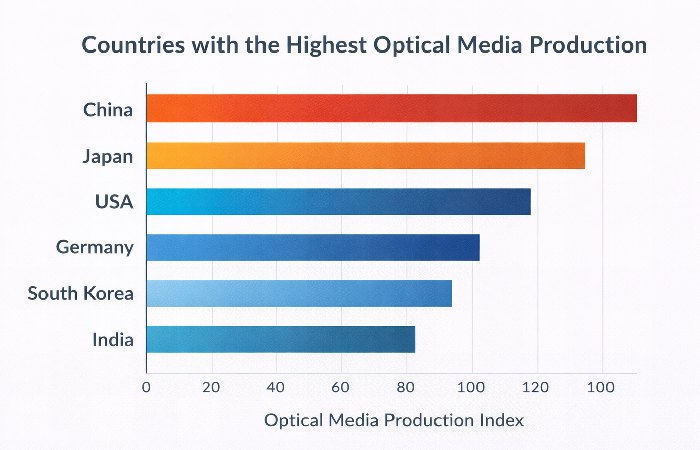
Countries with the Highest Optical Media Production
Top CD Printer Models and Specifications Comparison
| Model | Brand | Print Resolution | Disc Capacity | Printer Type |
| Epson Discproducer PP-100 | Epson | 1440 dpi | 100 discs | Automated |
| Primera Bravo SE-3 | Primera | 4800 dpi | 20 discs | Inkjet |
| Rimage Allegro 20 | Rimage | 4800 dpi | 20 discs | Inkjet |
| Microboards G4 | Microboards | 4800 dpi | 50 discs | Automated |
| Epson Artisan 50 | Epson | 5760 dpi | 1 disc | Inkjet |
| Canon Pixma TS702 | Canon | 4800 dpi | 1 disc | Inkjet |
| Primera Bravo 4200 | Primera | 4800 dpi | 100 discs | Automated |
| Epson XP-7100 | Epson | 5760 dpi | 1 disc | Inkjet |
| Rimage Prism III | Rimage | Thermal | 50 discs | Thermal |
| TEAC P-55 | TEAC | Thermal | 1 disc | Thermal |
Cost of CD Printers and Printing Media
| Category | Price Range | Features |
| Home CD Printers | $150 – $400 | Basic disc printing |
| Office Printers | $400 – $900 | Better resolution |
| Professional Disc Printers | $900 – $3000 | Automated disc printing |
| Industrial Disc Publishers | $3000+ | High-volume production |
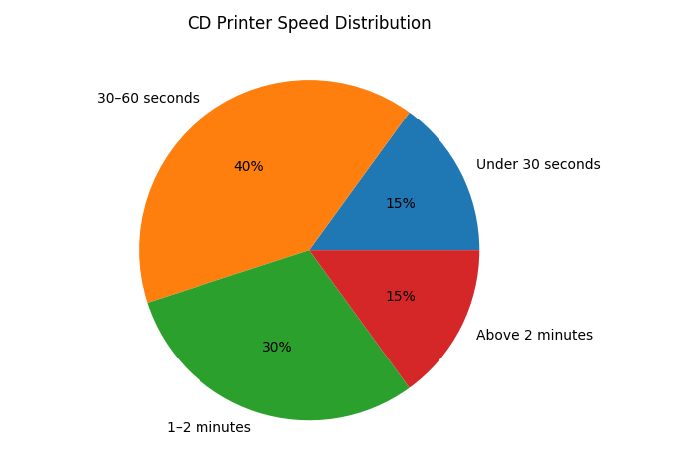
CD Printer Speed Distribution
CD Printing Ink Types and Print Quality Comparison
| Ink Type | Print Quality | Durability | Usage |
| Dye Ink | High color quality | Medium | Inkjet printers |
| Pigment Ink | Good color accuracy | High | Professional printing |
| Thermal Ribbon | Extremely durable | Very high | Industrial printers |
| UV Ink | High-gloss finish | Very high | Advanced disc printing |
Types of Printable CDs and DVDs
| Disc Type | Storage Capacity | Common Usage |
| CD-R | 700 MB | Music, data storage |
| CD-RW | 700 MB | Rewritable discs |
| DVD-R | 4.7 GB | Movies and backups |
| DVD-RW | 4.7 GB | Rewritable DVDs |
| Dual Layer DVD | 8.5 GB | High-capacity storage |
CD Printing vs Label Stickers
| Feature | Direct CD Printing | Label Stickers |
| Appearance | Professional look | Less professional |
| Durability | Long-lasting | May peel off |
| Printing Quality | High resolution | Limited quality |
| Application | Automatic printing | Manual placement |
| Balance of Disc | Balanced | May cause imbalance |
| Cost | Higher initial cost | Lower initial cost |
| Time Efficiency | Faster for bulk printing | Slower manual process |
| Risk of Damage | Low | Label misalignment possible |
Benefits of Using CD Printers
- Professional disc appearance
- High-quality printing resolution
- Efficient bulk printing
- Long-lasting designs
- Custom branding for discs
- No need for label stickers
- Improved disc balance
Limitations and Challenges of CD Printing
- Initial printer cost may be high
- Requires printable discs
- Ink cartridges can be expensive
- Slower compared to paper printing
- Optical media usage declining
Technologies Used in CD Printing
- Inkjet disc printing technology
- Thermal transfer printing
- Robotic disc loading systems
- Disc publishing software
- Optical media burning technology
How to Print on CDs Using a Printer
| Step | Action |
| 1 | Design disc artwork using software |
| 2 | Insert printable CD into disc tray |
| 3 | Load disc tray into printer |
| 4 | Adjust printer settings |
| 5 | Start printing process |
| 6 | Wait for printing to complete |
| 7 | Remove printed disc and allow ink to dry |
CD Printer Maintenance and Ink Usage Guide
| Maintenance Task | Purpose |
| Clean print heads | Maintain print quality |
| Replace ink cartridges | Ensure proper printing |
| Clean disc tray | Prevent printing errors |
| Update printer software | Improve compatibility |
| Regular test prints | Monitor printer performance |
Industries That Still Use CD Printing
- Software distribution companies
- Music production studios
- Film and video production
- Corporate data distribution
- Educational institutions
- Government archives
Future of CD Printing and Optical Media
Although cloud storage and digital downloads have reduced the demand for optical media, CD and DVD printing still remain important in specific industries such as media production, software distribution, and archival storage. Professional disc publishing systems continue to evolve with better printing quality, automation, and durability. While overall usage may decline, specialized sectors will likely continue using disc printing technology for secure and physical data distribution.
Frequently Asked Questions
- Can all printers print directly on CDs?
No, only printers that support direct disc printing with special disc trays can print directly on CDs or DVDs.
- What type of CDs are required for printing?
You must use printable CDs or DVDs that have a special ink-absorbent surface designed for printing.
- Is CD printing better than using labels?
Yes, direct CD printing is usually more professional and durable compared to label stickers.
- How long does it take to print on a CD?
Most printers take 30 seconds to 2 minutes depending on resolution and printer type.
- Are CD printers still used today?
Yes, many industries such as media production, software distribution, and archival storage still use CD printing technology.
Conclusion
Printers that support CD printing provide a professional solution for creating customized discs with high-quality designs and durable prints. By using direct printing technology, businesses and individuals can produce branded CDs and DVDs without relying on labels or manual methods. While digital distribution has reduced the demand for optical media in some sectors, disc printing remains valuable in industries that require physical media distribution and long-term data storage.