

Table of Contents
What Is an E-Library?
An E-Library (Electronic Library), also known as a Digital Library, is an online collection of books, research papers, journals, magazines, and multimedia resources that can be accessed through the internet. Instead of visiting a physical building, users can search, read, download, or store digital content using computers, tablets, or smartphones.
E-libraries organize information using databases, catalog systems, and search tools so readers can quickly find academic materials, literature, or educational resources from anywhere in the world. Platforms such as Project Gutenberg and JSTOR are well-known examples that provide access to thousands of books and scholarly articles online.
How E-Libraries Work
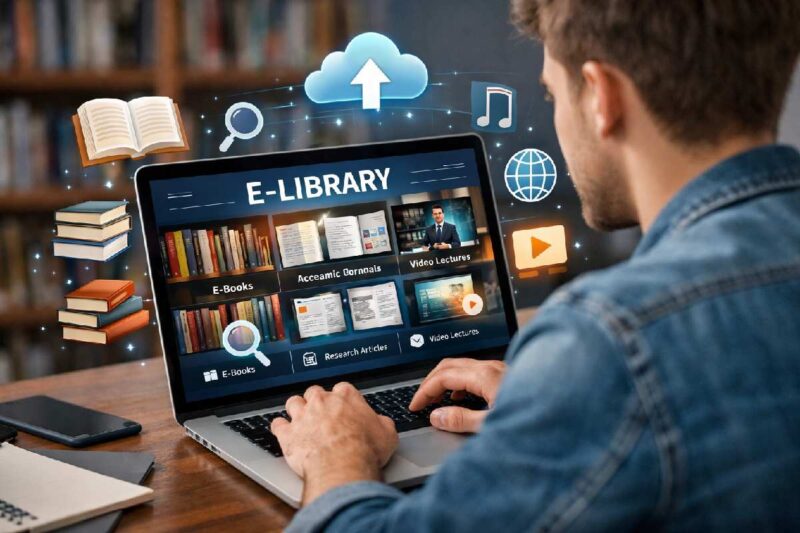
- Digital content such as books, journals, and reports is converted into electronic formats (PDF, EPUB, HTML).
- These files are stored in online databases or servers managed by library systems.
- A search engine or catalog system allows users to locate resources by title, author, subject, or keyword.
- Users log in through a website or mobile application.
- Some platforms provide free open-access content, while others require subscriptions or institutional access.
- Readers can read online, download files, or bookmark resources for later use.
- Libraries use metadata systems to organize and classify digital materials.
Evolution From Physical Libraries to E-Libraries
Libraries have evolved significantly with the development of digital technologies. Traditional libraries depended on printed books stored on shelves, requiring users to visit the location physically. With the internet and digital storage technologies, information can now be accessed instantly from anywhere in the world through e-libraries.
Evolution of Library Systems
| Period | Library Type | Key Characteristics |
| Before 1990 | Traditional Libraries | Physical books, manual catalog cards |
| 1990–2000 | Early Digital Catalogs | Computers used for indexing books |
| 2000–2010 | Hybrid Libraries | Combination of digital and printed resources |
| 2010–2020 | Fully Digital Libraries | Large online databases and e-books |
| 2020–Present | Cloud-Based E-Libraries | AI search, remote access, mobile compatibility |
Types of E-Libraries Available Today
| Type of E-Library | Description | Example Platforms |
| Academic Digital Libraries | Research papers and journals for universities | JSTOR |
| Public Digital Libraries | Free books for the general public | Project Gutenberg |
| Institutional Libraries | Managed by universities or research institutes | University repositories |
| Corporate Knowledge Libraries | Used by companies for internal resources | Corporate learning portals |
| National Digital Libraries | Government-supported knowledge platforms | National Digital Library of India |
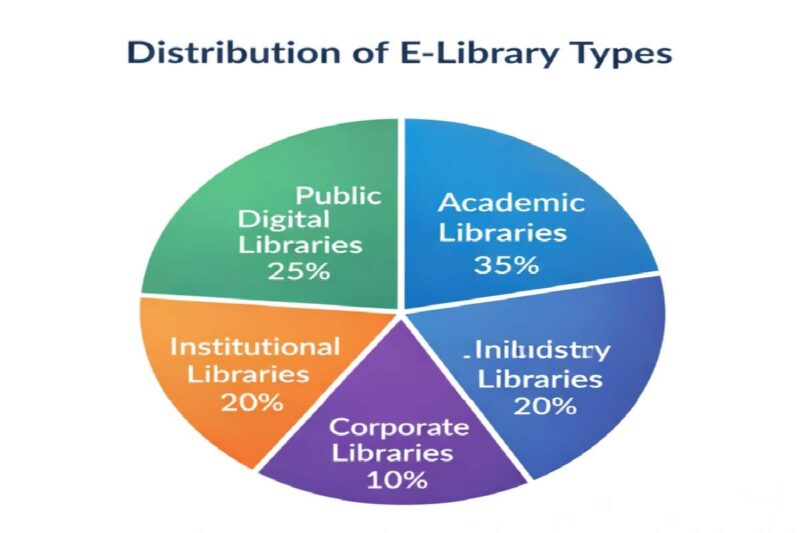
Distribution of E-Library Types
E-Library System
Key components of an e-library system include:
- Digital content storage servers
- Library management software
- Metadata indexing systems
- User authentication and access control
- Online catalog and search engines
- Cloud storage and backup systems
- Content distribution networks
- Digital rights management systems
Popular E-Library Platforms and Digital Library Websites (Top 10)
| Platform | Country | Content Type | Access Type |
| Project Gutenberg | USA | Free eBooks | Free |
| JSTOR | USA | Academic journals | Paid |
| Google Books | Global | Books and previews | Free/Paid |
| Internet Archive | USA | Books, media, research | Free |
| National Digital Library of India | India | Educational content | Free |
| Open Library | USA | Digital books | Free |
| ScienceDirect | Netherlands | Research papers | Paid |
| SpringerLink | Germany | Journals and books | Paid |
| PubMed Central | USA | Medical research | Free |
| Directory of Open Access Journals | Sweden | Academic journals | Free |
Cost of E-Library Systems and Digital Library Platforms
Free vs Premium Digital Library Platforms
| Platform Type | Example Platforms | Cost | Features |
| Open Access Libraries | Project Gutenberg, Open Library | Free | Public domain books |
| Government Digital Libraries | National Digital Library of India | Free | Educational resources |
| Academic Databases | JSTOR, ScienceDirect | $20–$50 monthly or institutional access | Research journals |
| Publisher Platforms | SpringerLink | Subscription | Academic books and articles |
| Enterprise Library Systems | Corporate knowledge systems | $500–$5000 yearly | Advanced management tools |
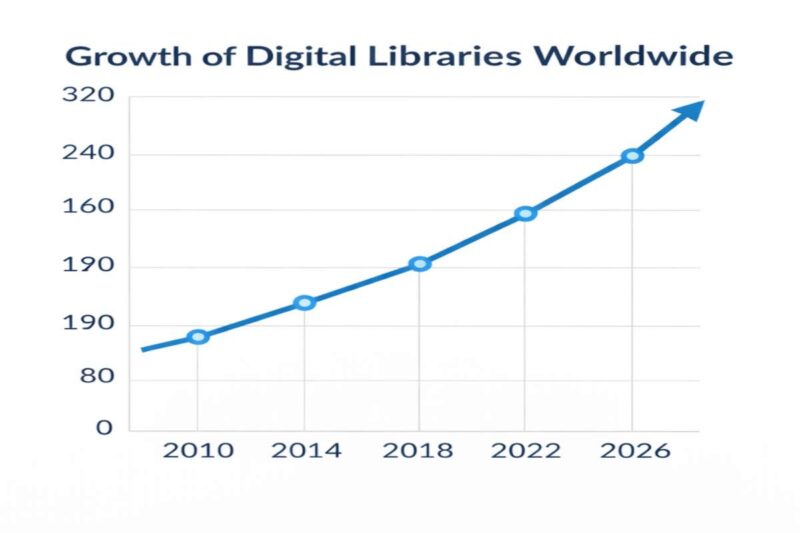
Growth of Digital Libraries Worldwide
Benefits of Using E-Libraries for Students, Researchers, and Businesses
| Benefit | Description |
| Instant Access | Information available anytime online |
| Global Availability | Access resources from anywhere |
| Large Resource Collection | Millions of digital books and journals |
| Cost Efficiency | Reduces printing and storage costs |
| Easy Search | Fast keyword-based searching |
| Space Saving | No physical storage required |
| Collaboration | Researchers share resources easily |
| Environment Friendly | Reduces paper usage |
| Continuous Updates | Content updated regularly |
| Accessibility | Supports remote learning and research |
Technologies Used in E-Libraries
- Cloud computing systems
- Digital database management
- Optical character recognition (OCR)
- Artificial intelligence search engines
- Metadata cataloging systems
- Content management systems
- Digital rights management tools
- Online indexing and retrieval systems
How to Access an E-Library
| Step | Action |
| 1 | Choose a digital library website |
| 2 | Create a user account if required |
| 3 | Search using title, author, or keyword |
| 4 | Select the desired book or article |
| 5 | Read online or download the resource |
| 6 | Save or bookmark for later access |
E-Libraries vs Traditional Libraries
| Feature | E-Library | Traditional Library |
| Accessibility | Available online 24/7 | Limited to physical hours |
| Location | Access from anywhere | Must visit library |
| Storage | Unlimited digital storage | Limited shelf space |
| Search Speed | Instant keyword search | Manual catalog search |
| Resource Format | Digital files | Printed books |
| Cost | Often cheaper or free | Physical maintenance costs |
| Interaction | Online reading | Physical study environment |
Limitations and Challenges of E-Libraries
- Internet Dependency: Accessing an e-library requires a stable internet connection, which may not be available in all regions.
- Digital Divide: People without computers, smartphones, or digital literacy may find it difficult to use e-libraries.
- Copyright Restrictions: Many books and journals cannot be freely shared due to copyright laws and licensing agreements.
- Subscription Costs: Some academic databases require expensive institutional subscriptions.
- Technical Issues: Server downtime, system errors, or software bugs can temporarily block access to resources.
- Data Security Risks: Digital systems may face cybersecurity threats such as hacking or unauthorized access.
- Limited Physical Interaction: Users cannot experience physical browsing or reading printed books.
- Digital Fatigue: Long hours of reading on screens can cause eye strain and discomfort.
- File Format Compatibility: Some devices may not support certain digital book formats.
- Long-Term Digital Preservation: Maintaining digital files for decades requires constant system upgrades and backups.
How to Create or Build Your Own E-Library
| Step | Process | Description | Tools or Platforms |
| 1 | Define Purpose | Decide whether the e-library will focus on education, research, or public reading | Planning tools |
| 2 | Collect Digital Content | Gather books, journals, research papers, or documents in digital format | PDF, EPUB files |
| 3 | Digitize Printed Books | Scan physical books and convert them into digital files | OCR scanning software |
| 4 | Organize Metadata | Add titles, authors, keywords, and categories for searchability | Library catalog systems |
| 5 | Choose Library Software | Install a digital library management system | Examples include DSpace or Koha |
| 6 | Store Files on Servers | Upload digital content to secure cloud or local servers | Cloud hosting services |
| 7 | Build a Website Interface | Create a user-friendly website for accessing the library | CMS platforms |
| 8 | Implement Search System | Enable keyword search and filtering tools | Database indexing |
| 9 | Set Access Permissions | Control who can read, download, or upload resources | User authentication systems |
| 10 | Launch and Maintain | Regularly update content and maintain the digital infrastructure | IT maintenance |
How Publishers and Authors Distribute Books in E-Libraries
| Step | Distribution Stage | Description | Example Platforms |
| 1 | Manuscript Creation | Authors write and prepare their books or research papers | Publishing tools |
| 2 | Digital Conversion | Books are converted into formats such as PDF, EPUB, or HTML | Digital publishing software |
| 3 | Copyright Registration | Authors or publishers secure copyright protection | Intellectual property offices |
| 4 | Licensing Agreements | Libraries sign agreements with publishers to host content | Academic library networks |
| 5 | Platform Upload | Digital files are uploaded to e-library databases | Google Books |
| 6 | Metadata Indexing | Book details such as title, author, subject, and keywords are added | Library catalog systems |
| 7 | Access Control | Platforms implement digital rights management (DRM) to control reading or downloads | DRM systems |
| 8 | Public Availability | Readers can search and access the book through the digital library interface | Open Library |
| 9 | Usage Tracking | Platforms track downloads, citations, and readership statistics | Analytics tools |
| 10 | Updates and Revisions | New editions or corrections are uploaded by publishers when needed | Publishing platforms |
Future of E-Libraries
The future of e-libraries is expected to include advanced technologies such as artificial intelligence-based search systems, personalized learning recommendations, and immersive digital reading environments. Cloud computing and big data analytics will enable libraries to manage massive collections efficiently, making global knowledge accessible to more people than ever before.
Frequently Asked Questions
1. What is the main purpose of an e-library?
The main purpose of an e-library is to provide digital access to books, research papers, journals, and other educational resources through the internet.
2. Are e-libraries free to use?
Some e-libraries are completely free, especially open-access platforms, while others require subscriptions or institutional access.
3. What devices can be used to access an e-library?
Users can access e-libraries using computers, laptops, tablets, smartphones, or e-readers.
4. Are e-libraries replacing traditional libraries?
E-libraries are not completely replacing traditional libraries but are complementing them by providing remote digital access to resources.
5. Can students use e-libraries for research?
Yes, e-libraries provide academic journals, research papers, and educational materials that are widely used by students and researchers worldwide.
Conclusion
E-libraries have transformed the way people access knowledge and information. By combining digital storage, internet connectivity, and advanced search technologies, these platforms allow users to explore millions of books and research materials instantly. Whether used by students, researchers, or professionals, digital libraries offer convenience, accessibility, and cost-effective learning opportunities. As technology continues to evolve, e-libraries will play an even more significant role in global education, research, and information sharing.